Whoever is responsible for checking for coverage, the process is as follows:
In the three working days following the distribution, coverage is checked against the publications listed on the spreadsheet in the morning (before 10am), at lunchtime (between 12 and 2pm), and in the afternoon (after 4pm).
For the remainder of the time agreed to, coverage is checked in the morning (before 10am) and in the afternoon (after 4pm). If the publication has a link to individual journalist and the stories they have written (ie HSJ, Computer Weekly), then remember to check this link.
Checking activity is supplemented with searches on Google, Bing and Yahoo for the client’s name, phrases from the title and first paragraph of the release, and any other keywords the account manager has identified. Set up Google alerts and Talkwalker alerts.
You can also check on Roxhill to see who has opened, clicked, bounced or unsubscribed to the distribution, see below:
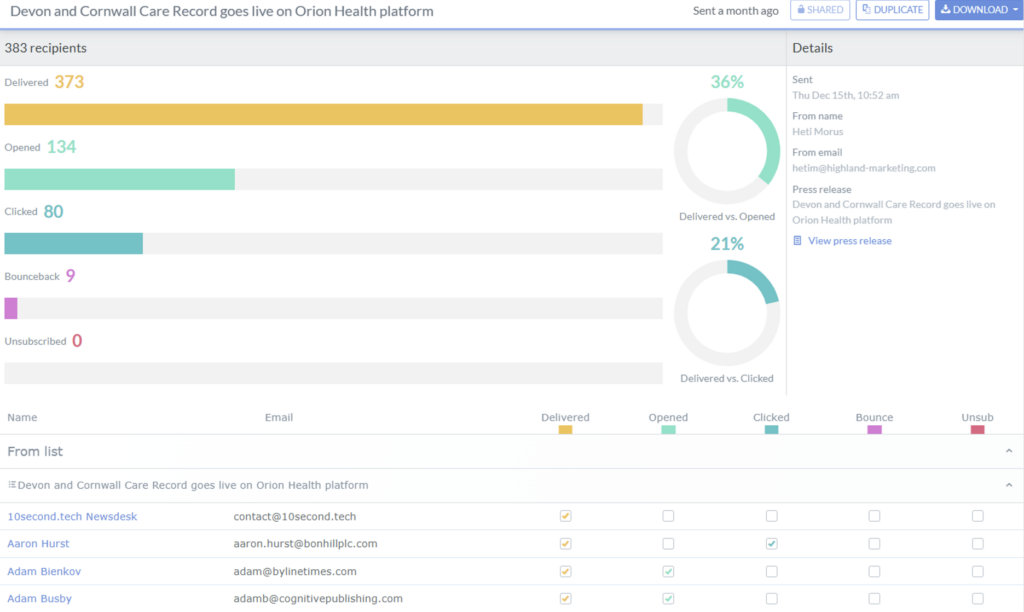
To do the above:
- Sign into Roxhill.
- Select distribution.
- Select campaigns.
- Then select the campaign you have just sent out (this will work a good few hours after distribution).
- You can then scroll down and see who has opened, clicked, bounced or unsubscribed.
- If someone has unsubscribed, you need to make sure you change their GDPR to rejected. You do this by accessing their profile the selecting GDPR then click rejected. This will then mean no more emails will be sent to this journalist and they will not appear in any searches you do on Roxhill.
- If the distribution has been opened or clicked then go to the publications website and check to see if they have published the release.
Do also look out for coverage when doing market scanning of the key publications. Checking for coverage is for two calendar weeks unless indicated otherwise by the account lead.
Where coverage is obtained, you save the links to this in the Coverage Links document. This is a word document and should be saved in the coverage folder of the relevant client. See section 7.5.
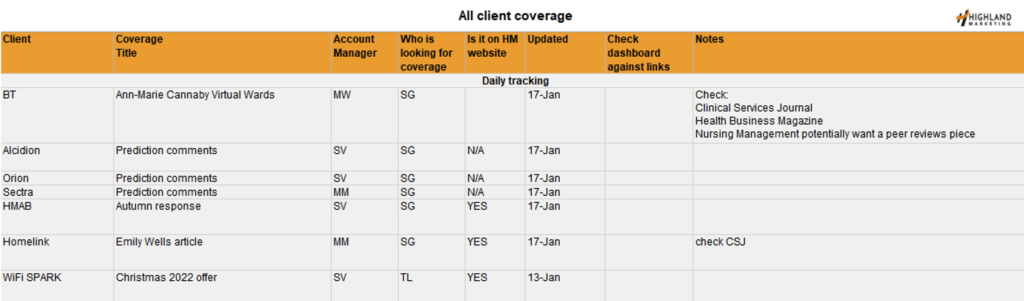
Please also add the release to the coverage logging spreadsheet which is saved here: SG, TL & HM Coverage list.xlsx this spreadsheet is used for all the account execs to keep track of coverage and if anyone else needs to cover tracking coverage then it is all here. All you need to add is client, coverage title, account manager, who is looking for coverage, then update the other fields, when necessary, see below:
Once all the coverage has been collated you should then add into Internal which updates the dashboard see the Roxhill section.